Uploading configurations
By default the MS2 receiver is configured to transmit every protocol on every port:
UBX(u-blox’s proprietary binary format)NMEA(a standard used mainly in marine applications and in the exchange of GPS satellite data. The protocol is developed and maintained by the National Marine Electronics Association)RTCM3(Radio Technical Commission for Maritime Services is a communication protocol for sending differential GPS (DGPS) data to a GPS receiver from a secondary source such as a radio receiver. The format does not define the source of the messages and has been used with systems as different as long-wave marine radio, satellite communication broadcasts and distribution over the Internet)
Warning
Unfortunately many programs cannot read binary sentences, and vice versa. For example:
- to work with almost every piece of software that handles GNSS data we have to transmit plain-text sentences, that is NMEA
- to record a static session, on the other hand, we have to set the receiver to log raw data, which in our case means the proprietary UBX format.
Settings from a file
This configuration “switch” can be done with the free software provided by u-blox, called U-Center, which lets you change or edit these settings.
Plug the supplied USB/USB-C cable into the receiver and start U-Center, as shown in the figure below:
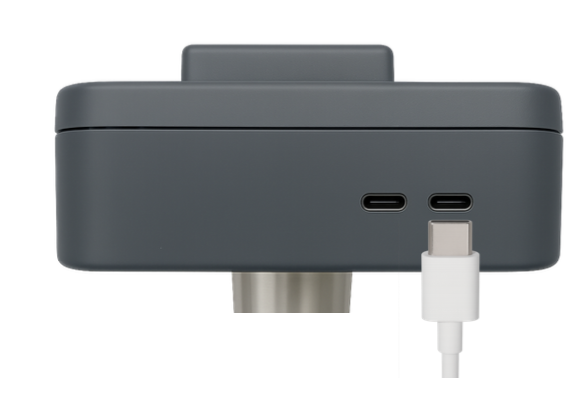
Fig.1 Plugging the USB type C connector into the receiver
Configurations are usually prepared as text files (txt format) holding settings saved earlier, which can be loaded from Tools > Receiver Configuration, for example:
- For firmware 1.50:
UBX+NMEA(UBX+NMEA sentences at 1 Hz)
- For firmware 1.32:
NMEA(NMEA sentences only, at 1 Hz)UBX+NMEA(UBX+NMEA sentences at 1 Hz)RTCM3+NMEA(RTCM3+NMEA sentences at 1 Hz)RTCM3(RTCM3 sentences at 1 Hz)
- For firmware 1.13:
NMEA(NMEA sentences only, at 1 Hz)UBX(UBX sentences only, at 1 Hz)UBX+NMEA(UBX+NMEA sentences at 1 Hz)ONLY_GGA_10HZ(GGA sentences only, at 10 Hz)
These files are loaded by choosing their path and uploading them with the Transfer File > GNSS button.
Warning
Check carefully which firmware version is on board the receiver from Message View > UBX-MON-VER, otherwise the file will not be uploaded in full.
Tip
If you would like a custom configuration, send your request by e-mail to solutop@gmail.com; see the section “Remote support”.
Video
Here (1) you can see how to upload the files you have generated.
NMEA and rate settings
The receiver can output NMEA sentences on several ports, including I2C, UART1, UART2, USB and SPI. In U-Center set:
- View > Configuration View > PRT (Ports): choose the Target, the protocol for “in” and “out” and, where applicable, the baud rate, as in figure 1.
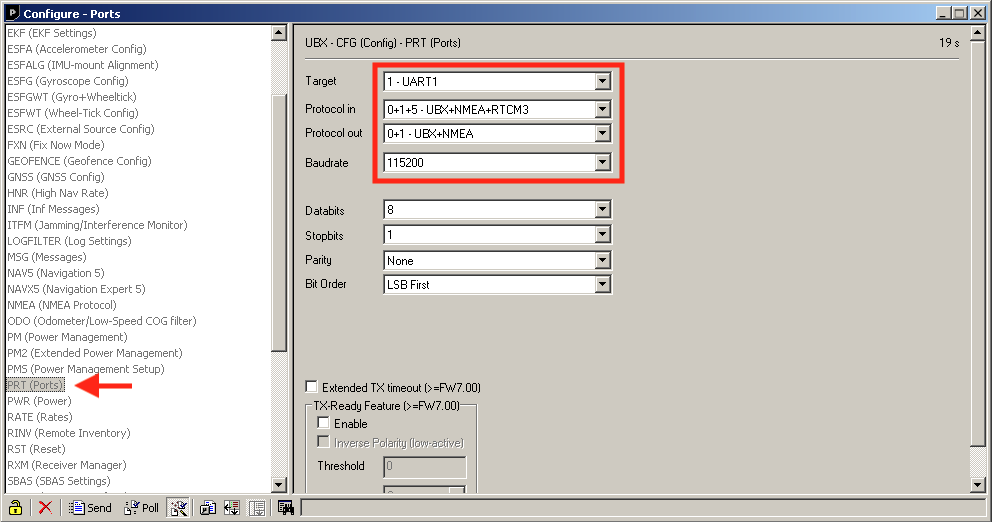
Fig.2 U-Center, setting the ports (e.g. UART1)
- View > Configuration View > NMEA (NMEA Protocol): set it as in figure 2.
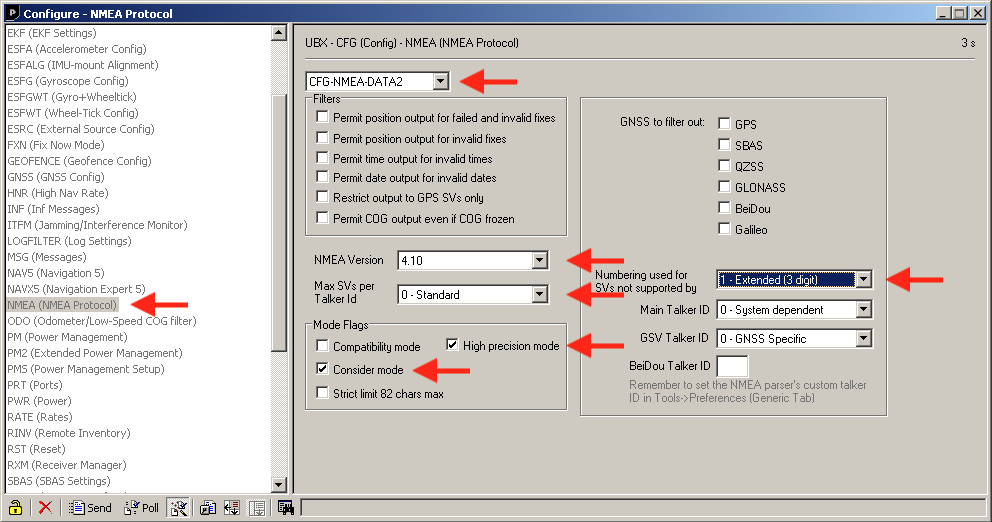
Fig.3 U-Center, setting the NMEA parameters
- View > Configuration View > MSG (Messages): set each NMEA sentence with its output interval in seconds, as in figure 3.
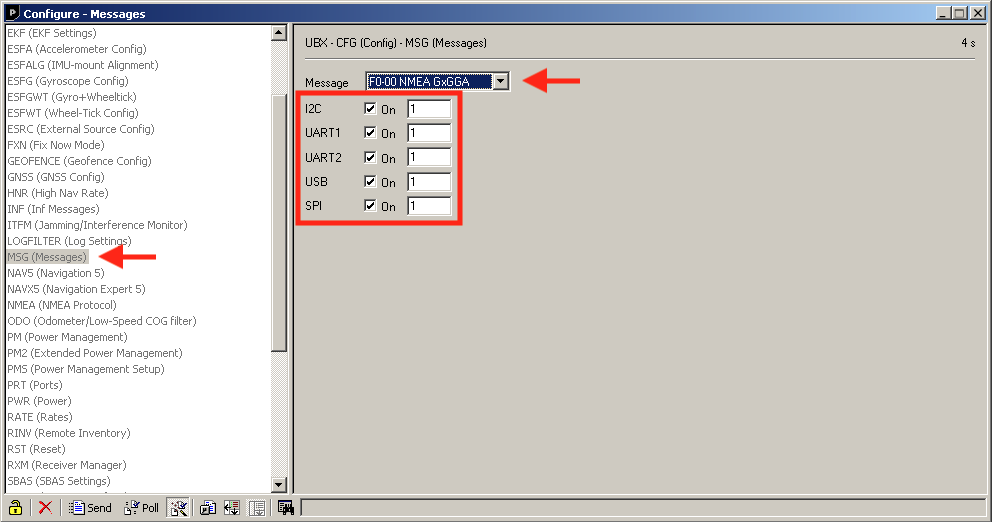
Fig.4 U-Center, setting the output messages (e.g. GGA)
- View > Configuration View > RATE (Rates): set the output rate. The default is 1 Hz, but for certain applications (integration with ground-penetrating radar or similar sensors, for instance) this setting has to be changed.
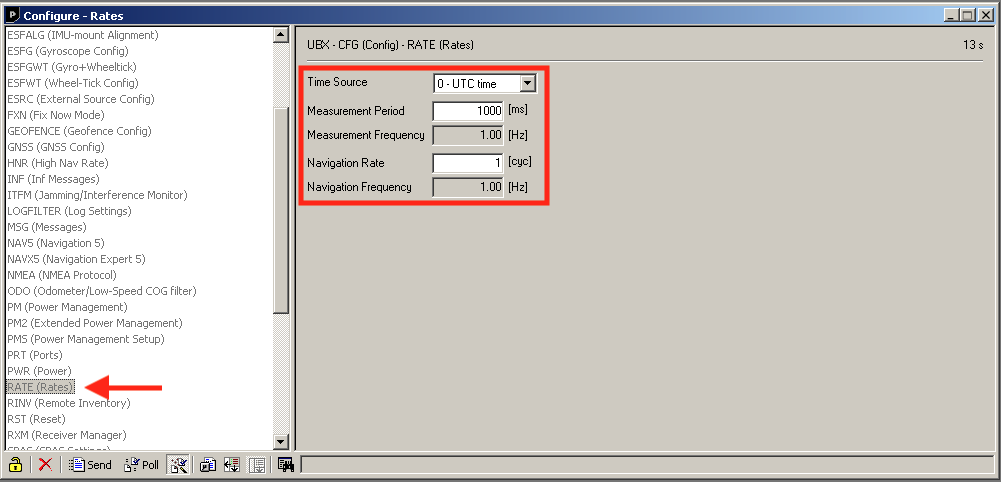
Fig.5 U-Center, setting the output rate (e.g. 1 Hz)
Warning
If you are out in the field and need to load a configuration on the spot but you have neither:
- a Windows PC with U-Center installed
- nor a USB-C cable
you can, as an exception, load any configuration previously saved on your Android device with the “GNSS Master” Android app, provided you have a USB-C to USB-C cable. The full procedure is shown in this video.
What is new in the latest version
Firmware version 1.50 (July 2024) brings several new features and improvements over the previous version 1.32.
New features:
- BeiDou support for SPARTN: SPARTN support extended to the BeiDou constellation, widening the correction capabilities.
- Interference detection and logging: an interference detector with logging, to monitor and record any disturbance in the signal.
- Conservative ambiguity resolution mode: for applications that need fewer false RTK fixes, a mode has been added that lengthens the time needed to resolve the ambiguities, improving reliability.
- Support for RTCM version 3.4: RTCM protocol support updated to version 3.4, improving interoperability with other devices and services.
Improvements:
- Better SPARTN modelling: modelling for SPARTN services optimised during periods of high ionospheric activity, improving accuracy in difficult conditions.
- More robust interference detection: the recovery mechanism of the antenna supervisor is more robust, which makes the receiver more reliable.
- Better SBAS reception: more robust reception of SBAS corrections, improving positioning accuracy and reliability.
- Extended BeiDou satellite support: BeiDou satellites 38 to 58 enabled for HPG processing, widening coverage and accuracy.
These changes are aimed at improving the accuracy, safety and reliability of the MS2 receiver across the various GNSS applications.